裝置排程 (Update Rings & Restart Behavior)
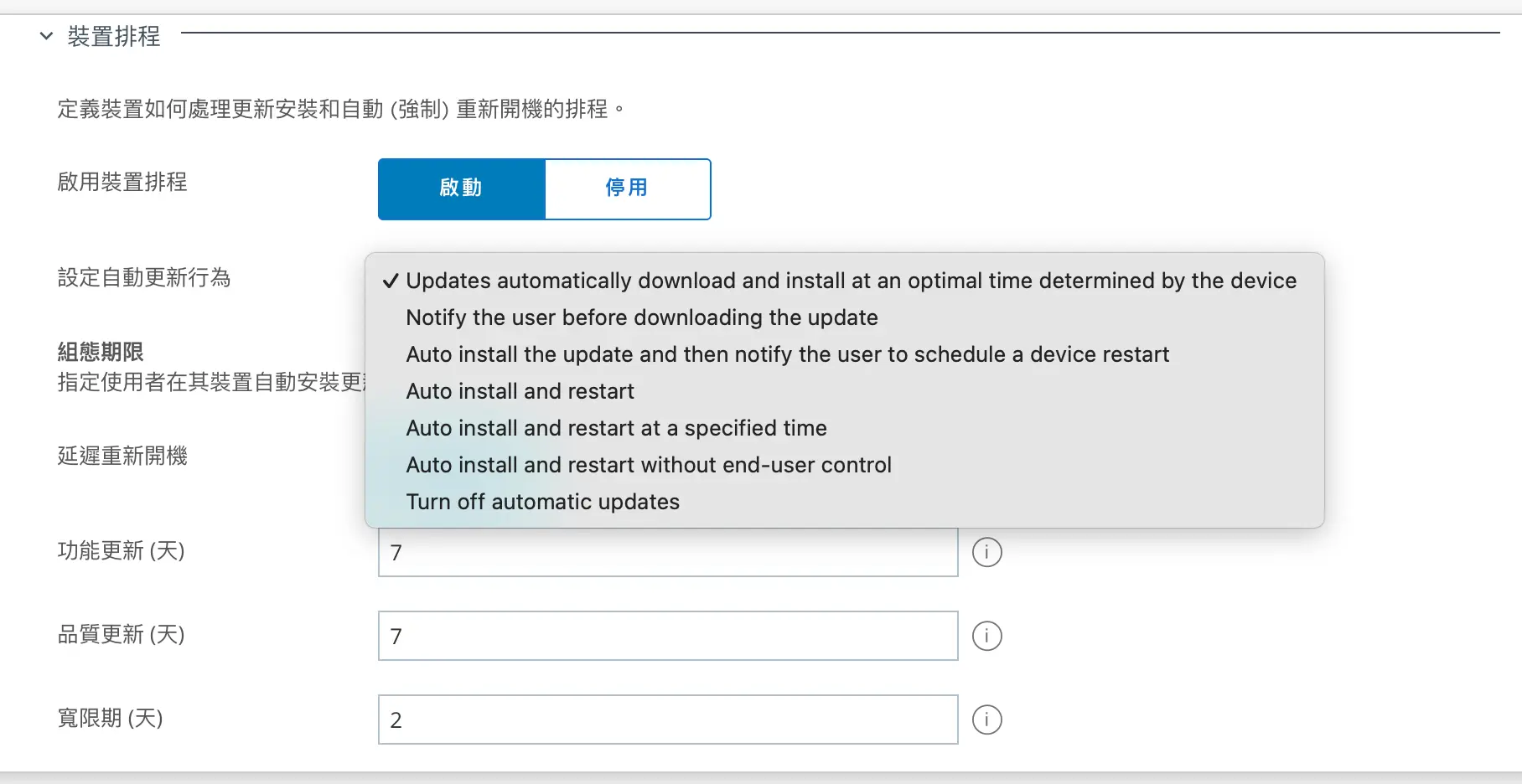
此區域用來定義 更新下載、安裝與重啟的策略,主要選項如下:
- Updates automatically download and install at an optimal time determined by the device
- 說明:系統會自動判斷最佳時機進行下載與安裝,盡量避免影響使用者工作。
- 特點:最貼近原生 Windows Update 的「智慧排程」模式,對使用者干擾最少。
- 適合對象:一般使用環境,兼顧使用者體驗與安全。
- Notify the user before downloading the update
- 說明:在開始下載更新前,會先通知使用者,由使用者選擇是否要進行下載。
- 特點:給予使用者高度控制,能避免在不適合的時候佔用網路或儲存空間。
- 適合對象:頻寬有限或對下載時機要求嚴格的環境。
- Auto install the update and then notify the user to schedule a device restart
- 說明:更新會自動下載並安裝,但不會立刻重開機,而是通知使用者自行排程重啟。
- 特點:保證更新已經安裝,但重開機時間由使用者決定,干擾較小。
- 適合對象:需要確保更新落地,但又不想強制中斷工作的環境。
- Auto install and restart
- 說明:更新自動下載、安裝,並自動重開機。
- 特點:使用者沒有額外選擇,更新完成後一定會重啟。
- 適合對象:高安全性環境(例如金融機構、政府單位),需確保更新立即生效。
- Auto install and restart at a specified time
- 說明:自動下載、安裝,並在管理者指定的時間重開機。
- 特點:可控性高,避免在上班時間中斷使用者。
- 適合對象:有固定維護時段(例如凌晨)的企業環境。
- Auto install and restart without end-user control
- 說明:自動下載、安裝並重啟,完全不給使用者選擇。
- 特點:最嚴格的模式,確保更新最快套用,但對使用者干擾最大。
- 適合對象:高度管制環境(如機房、終端設備 kiosk)。
- Turn off automatic updates
- 說明:完全停用自動更新,需人工或管理者強制推送。
- 特點:安全風險最高,通常僅用於特殊測試或舊系統相容需求。
- 適合對象:測試環境、需完全掌控更新時機的情境。
- 👉 總結來看:
- 使用者體驗優先 → 選 Updates automatically download and install at an optimal time 或 Auto install then notify restart。
- 安全性優先 → 選 Auto install and restart 或 Auto install and restart without control。
- 維護時段統一管理 → 選 Auto install and restart at a specified time。
- 測試或例外情境 → 選 Notify before download 或 Turn off automatic updates。
🔑 重點:這一層級主要影響 使用者體驗與安全性平衡,建議企業依據情境(一般辦公、測試群組、安全環境)設定不同模式。
-
延遲重開機 (Deadline)
- 指管理者允許裝置延後重啟的最大天數(例如功能更新 7 天,品質更新 7 天)。
- 在這段時間內,使用者可選擇何時重啟。
-
寬限期 (Grace Period)
- 當 Deadline 到期後,會進入「寬限期」。
- 在寬限期內,裝置會不斷提醒使用者盡快重啟,但仍允許他們推遲。
- 一旦寬限期結束,裝置就會強制重啟。
評分
暫時沒有留言。
成為第一個留言的人。